


Handwritten Notes to Text
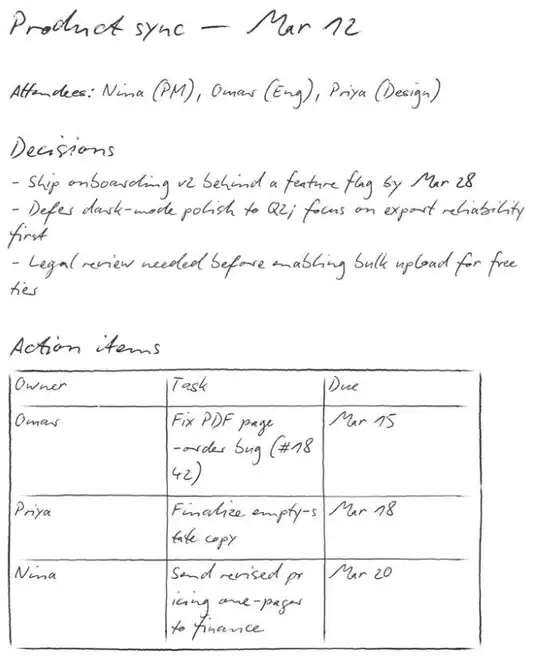
Convert notebook photos or PDFs into one ordered digital transcript with headings, dates, lists, and page breaks preserved.
- Keeps multi-page notebook order
- Detects dates, headings & lists
- Export to TXT, Word or JSON
Upload your document to get started
Drag and drop files here

How Notes to Text Works
Upload
Drag & drop or click to upload your file. Supports JPG, JPEG, PNG, WEBP, PDF.
Process
Our AI analyzes your document and extracts the relevant data automatically.
Download
Review the results and download as Text / Word / JSON.
Who Uses Handwritten Notes to Text?
Trusted by professionals across industries to save time and reduce errors
Students
Turn lecture notes into searchable study material for Docs, Notion, or Word.
Teachers
Digitise lesson notes, whiteboard follow-ups, and marked-up planning pages.
Writers
Move notebook drafts and research notes into an editable writing workflow.
Teams
Merge meeting pages in upload order into one shareable transcript.
Powerful Features
Everything you need for fast, accurate document processing
Multi-Page Order
Processes pages in upload order and joins them into one transcript
Page Breaks
Separates pages with --- markers so their boundaries remain visible
Heading & Date Detection
Formats visible headings, dates, and sections for faster scanning
Real Lists
Returns handwritten bullets and numbered items as structured lists
Useful Exports
Export the reviewed transcript to TXT, Word, or JSON
Before vs After
Before
Searching page by page through notebooks and retyping important notes by hand.
After
One ordered, editable transcript with page boundaries and note structure intact.
Handwritten Notes to Text FAQ
Common questions about using Handwritten Notes to Text
Upload clear photos, scans, or a PDF of your notes. The pages are transcribed in upload order into editable text that you can review and export.
Related Tools
Handwriting & OCR
Turn handwriting, scans, and difficult images into editable text.
Handwriting to Word
Convert handwritten pages into layout-preserving Markdown and a clean editable Word document.
Cursive Translator
Upload a photo, scan, or PDF of real cursive handwriting and receive faithful, editable typed text.
Notes to Text is one of 17 document tools in DocuGenie
Skip paying for a separate app for every task. One DocuGenie subscription bundles handwriting OCR, image-to-text, PDF and Excel conversion, translation, summaries, and more - from $9/mo. Use your credits on whichever tool you need.