


Handwriting to Text Converter
Convert cursive, print, and scanned handwriting into clean, editable text with AI HTR - purpose-built, not generic OCR.
- Reads cursive, print & mixed handwriting
- Returns math as LaTeX, tables as Markdown
- Exports to Word, Excel, TXT & CSV
Upload your document to get started
Drag and drop files here

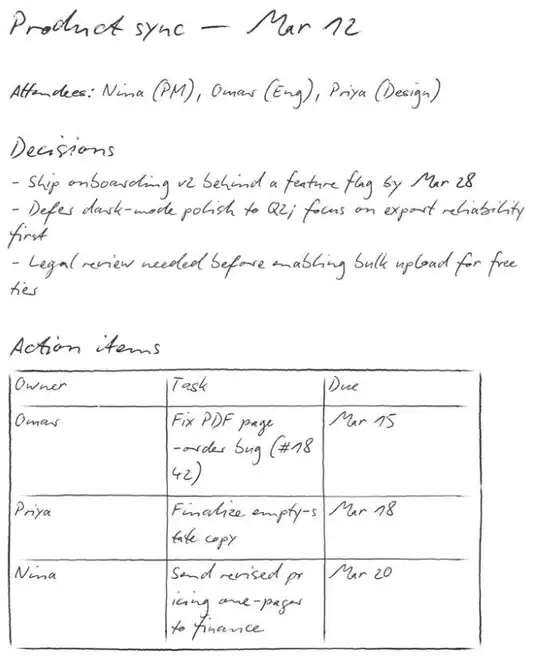
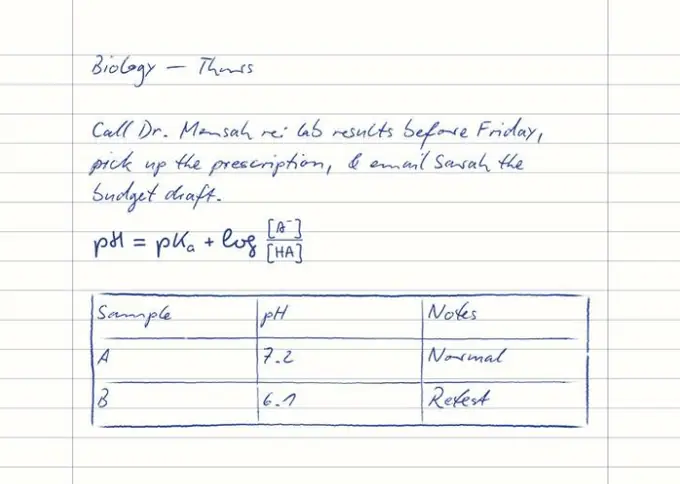
See It On Messy Cursive
Print-focused OCR falls apart on cursive. Handwriting recognition reads it the way you do.
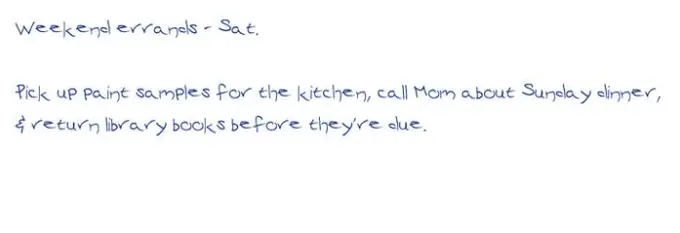
Weekend errands - Sat. Pick up paint samples for the kitchen, call Mom about Sunday dinner, & return library books before they're due.
Weekend erronds - Sat. Pick up puint somples for Hu kitchen, coll Mom obout Sundoy dinner, & refurn library books befor Huir due.
Weekend errands - Sat. Pick up paint samples for the kitchen, call Mom about Sunday dinner, & return library books before they're due.
Illustrative comparison of how print-focused OCR mishandles cursive.
How Handwriting OCR Works
Upload
Drag & drop or click to upload your file. Supports JPG, JPEG, PNG, WEBP, PDF.
Process
Our AI analyzes your document and extracts the relevant data automatically.
Download
Review the results and download as Text / Copy to clipboard.
Who Uses Handwriting to Text Converter?
Trusted by professionals across industries to save time and reduce errors
Students & Lecture Notes
Turn handwritten lecture and class notes into editable, searchable text you can study, reuse, and drop into Notion or Google Docs before exams.
Genealogy & Family History
Transcribe old cursive letters, census records, parish registers, vital records, and deeds - then save the text alongside your FamilySearch or Ancestry research to read, search, and preserve your family history.
Journals & Diaries
Digitize handwritten journals, diaries, and bullet-journal pages while keeping the original meaning, so entries are backed up and searchable.
Research & Lab Notebooks
Convert handwritten lab notebooks and field notes into digital text to search past results and compile reports faster.
Medical & Clinical Notes
Turn handwritten clinical notes and prescriptions into clear typed text for accurate, readable digital records.
Legal & Case Notes
Digitize handwritten witness statements, intake forms, and case notes so documentation is organized, searchable, and easy to file.
Business Forms & Timesheets
Convert handwritten forms, timesheets, and survey responses into structured digital data in bulk - export to Excel or CSV without manual entry.
Historical Documents & Archives
Transcribe manuscripts, ledgers, and archival documents into searchable text so fragile originals can be read and shared digitally.
Powerful Features
Everything you need for fast, accurate document processing
Cursive & Print
Reads cursive, print, and mixed handwriting in a single page
AI Handwriting Recognition
Purpose-built HTR models for handwritten text, not generic print OCR
Built for Hard Cases
Tuned with custom pipelines for faded ink, messy scrawl, and tricky scripts
300+ Languages & Scripts
Handles many languages and scripts, including mixed-language pages
Layout Preserved
Keeps reading order, paragraphs, and line breaks
Math & Tables, Too
Handwritten equations come back as LaTeX and tables as Markdown - in one transcription
Bulk & Multi-Page
Process multiple pages and files in one batch
Export Anywhere
Download as TXT, Word, Markdown, Excel, or CSV
Private by Design
Files are processed in real time and never stored
Convert Handwriting, Math & Tables
From neat print to the writing other tools give up on - plus handwritten equations and tables, all in one transcription.
Cursive Handwriting
Convert cursive to text - joined-up writing that print OCR garbles is read cleanly.
Doctor's Handwriting
Decode messy prescriptions and clinical notes into clear, readable typed text.
Messy & Illegible
Read bad handwriting, rushed scrawl, and uneven spacing other apps can't handle.
Handwritten Math → LaTeX
Turn handwritten equations and formulas into clean LaTeX you can paste into docs, Overleaf, or notes.
Tables → Markdown
Detect handwritten tables and get them back as structured Markdown tables, rows and columns intact.
Old & Historical
Transcribe old cursive, manuscripts, and palaeography scripts like copperplate and Spencerian for genealogy and archives.
Faded, Faint & Blurry
Reads faint pencil, faded ink, low-contrast, and slightly blurry photos that trip up other tools.
Mixed Print & Cursive
Handle pages that mix printed text, cursive, math, tables, and margin notes in one go.
Languages & Scripts
Convert handwriting across many languages and scripts, including mixed-language pages.
Works With Your Notes & Apps
Export from your favorite note apps and tablets, then convert to editable text.
reMarkable
Export pages as PDF or image, then convert your handwriting to editable text.
GoodNotes
Turn GoodNotes pages into searchable, reusable text for docs and notes.
Notability
Convert handwritten Notability notes into clean digital text in seconds.
Apple Notes & Pencil
Digitize Apple Pencil scribbles and handwritten Apple Notes pages.
OneNote
Extract handwritten OneNote ink into editable, exportable text.
Samsung Notes & Google Keep
Upload handwritten pages from Android note apps and convert them to text.
Before vs After
Before
Squinting at messy cursive, retyping notebooks by hand, and losing hours to faded or historical handwriting you can't search.
After
Upload a photo or scan and get clean, editable text from cursive, print, or faded ink - searchable and ready to export to Word, Excel, or Markdown in seconds.
How We Compare
General OCR is built for printed text. Here's how purpose-built handwriting recognition compares.
| Feature | DocuGenie | Generic OCR (e.g. Google Lens) |
|---|---|---|
| Reads cursive handwriting | ✓ | ✕ |
| Handles messy or faded ink | ✓ | ✕ |
| Mixed handwriting styles on one page | ✓ | ✕ |
| Preserves layout & reading order | ✓ | Limited |
| Export to Word, Excel & Markdown | ✓ | Plain text only |
| Bulk & multi-page processing | ✓ | ✕ |
| Part of a full document toolset | ✓ | ✕ |
A Better Alternative to Generic OCR Apps
Tried other tools and hit a wall on cursive or messy pages? Here's why people switch.
Switching from Pen to Print?
A popular handwriting app, but it can struggle with cursive and bulk pages. DocuGenie reads cursive and exports to Word, Excel, Markdown, and CSV - inside a full document toolset.
Switching from Transkribus?
Powerful for historical archives, but it can be complex and slow to set up. DocuGenie gives instant transcription with no model training required.
Switching from Google Lens?
Great for printed text, weak on cursive and messy notes. DocuGenie is purpose-built for real-world handwriting and difficult pages.
Switching from Adobe Scan / Acrobat?
Built for printed scans, where handwriting often fails. DocuGenie is tuned for handwriting, faded ink, and edge cases.
Private & Secure by Design
Your documents stay yours.
Processed in real time
Your files are converted on the fly and never stored on our servers.
Never used for training
We don't use your documents to train AI models. Your handwriting stays yours.
Secure upload
Uploads are encrypted in transit between your device and our processor.
You stay in control
Review and edit every result before you export or share it.
How Handwriting Recognition Works
Handwriting recognition (HTR), not just OCR
Traditional optical character recognition (OCR) is built to match the fixed letterforms of printed fonts. Handwriting needs handwritten text recognition (HTR) - a form of intelligent character recognition (ICR) powered by AI vision models that read letters in context rather than matching exact glyph shapes. That's why purpose-built handwriting recognition reads cursive and varied writing far more reliably than generic OCR.
Why generic OCR fails on cursive
In cursive, letters join through ligatures and connecting strokes, so there are no clean gaps between characters for OCR to segment. Inconsistent letterforms, overlapping ascenders and descenders, and uneven spacing all reduce legibility for tools trained only on print. Our models are trained on real handwriting, so they infer words from context the way a human reader does.
From scan to searchable text
Upload a photo, scan, or PDF and the model transcribes the page while preserving reading order and paragraph structure. Handwritten equations are returned as LaTeX and tables as Markdown tables, right alongside the text. You get clean, editable output you can correct inline, then export to TXT, Word, Markdown, Excel, or CSV - turning a static image into a searchable, reusable document.
Handwriting to Text Converter FAQ
Common questions about using Handwriting to Text Converter
Upload a photo, scan, or PDF of your handwriting, and our AI handwriting OCR transcribes it into editable digital text. Review the result, fix any words inline, and export to TXT, Word, Markdown, Excel, or CSV.
Related Tools
Image to Text (OCR)
Extract text from any invoice,image or scanned document online. Supports JPG, PNG, PDF. No signup required.
Invoice Extractor
Extract invoice data and convert to Excel automatically. Get vendor, date, line items, and totals in seconds.
Receipt Scanner
Scan receipts and extract merchant, items, and totals. Perfect for expense tracking and bookkeeping.
Handwriting OCR is one of 10 document tools in DocuGenie
Skip paying for a separate app for every task. One DocuGenie subscription bundles handwriting OCR, image-to-text, PDF and Excel conversion, translation, summaries, and more - from $9/mo. Use your credits on whichever tool you need.