


Bank Statement Data Extractor
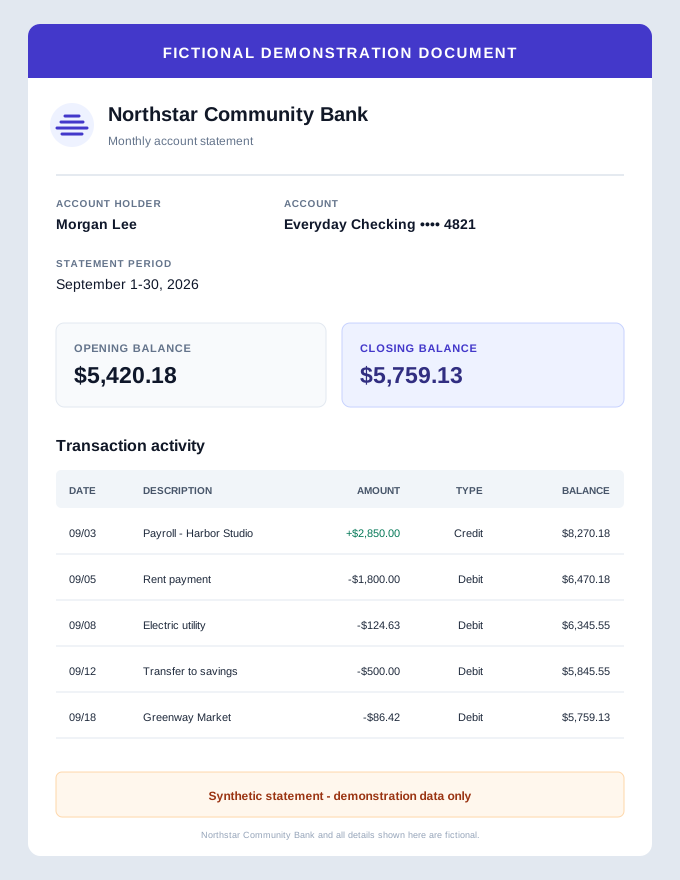
A bank statement parser turns visible account details and transaction rows into structured, reviewable text. Upload a PDF, scan, or statement image, compare the generated table with the source, and download the checked result.
- Extract dates, descriptions, amounts & balances
- Review the generated table beside the source
- Verify every transaction before using the data
Upload your document to get started
Drag and drop files here

How to Parse a Bank Statement
Upload the statement
Add a PDF or a supported JPG, JPEG, PNG, or WEBP statement image.
Extract account and transaction data
The parser organizes visible account details, statement dates, balances, and transaction rows.
Check and download the result
Compare the generated table with the source, correct the review text, and choose a download format.
What the Bank Statement Parser Extracts
The parser returns named fields when it can identify them in the uploaded statement. Missing output does not prove that information is absent from the source.
Bank and Account Details
Bank name, account holder, and the last four account-number digits when visible.
Statement Period
The statement start and end dates shown in the document.
Opening and Closing Balances
The stated balances at the beginning and end of the statement period.
Transaction Dates
A date for each transaction row when the statement provides one.
Descriptions and Amounts
Transaction descriptions, signed amounts, and debit or credit type.
Visible Running Balances
Per-transaction balances when they appear clearly in the source statement.
What a Bank Statement Parser Does
A bank statement parser converts visible account information and transaction tables into named fields that are easier to review and reuse. DocuGenie extracts account details, statement dates, balances, transaction rows, and the statement's full text; every generated field still needs to be checked against the source.
Parsing adds structure after OCR
Optical character recognition recovers text from a scan or image. Statement parsing goes a step further by identifying which text represents a date, description, amount, debit or credit, and running balance. Dense layouts, wrapped descriptions, faint scans, and unusual number formats can still produce mistakes.
A parsed table is not a reconciled account
A plausible transaction table does not prove that every row was captured or that the balances agree. DocuGenie's current multi-statement summary groups completed results; it does not validate every running balance. Check opening and closing balances and investigate any missing, duplicated, or sign-flipped transaction before using the data.
Use your bank's direct export when it is available
A CSV, OFX, QBO, or other transaction file downloaded directly from the bank is usually the better source because it avoids reading data back from a visual statement. Use a document parser when the PDF, scan, or image is the source you actually have.
Bank Statement Extraction Workflows
Use the parser for a reviewable first pass when transaction data is locked in a PDF or image—not as a substitute for accounting judgment or balance verification.
Month-End Preparation
Organize statement dates, balances, and transaction rows before checking them against the ledger.
Cash-Flow Review
Create a reviewable transaction table before sorting or analyzing money in and money out.
Tax Record Organization
Extract dated activity for review without treating debit and credit detection as tax categorization.
Audit Sample Preparation
Turn visible statement rows into a consistent first-pass table, then verify selected items against the source.
Multi-Account Review
Queue separate statements and keep each account's generated result available in the same workspace.
Historical Data Entry
Recover transaction details from archived statements when a direct bank export is no longer available.
Review the Extracted Statement Before You Use It
The workspace keeps the source and generated review together. Correct the editable text, but verify structured downloads separately because text edits do not rewrite the underlying extracted object.
Original Beside Result
Keep the uploaded statement visible while checking the generated review.
Editable Review Text
Correct the generated Markdown table before copying or downloading text.
Full Statement Text
Switch to the extracted full-text view when a field needs more context.
Multi-File Workspace
Queue several statements and review each completed result separately.
Structured JSON
Download the extracted account fields, transactions, and raw text as JSON.
Word and TXT Downloads
Save a readable version of the generated review for further checking.
Bank Statement Parsing vs Basic Text OCR
Use basic OCR when readable text is enough. Use bank statement parsing when account details and transaction rows need to be separated into named fields for review.
| Feature | DocuGenie | Basic text OCR |
|---|---|---|
| Returns named account fields | ✓ | ✕ |
| Separates transaction rows | ✓ | ✕ |
| Retains the statement's extracted text | ✓ | ✓ |
| Shows the original during review | ✓ | Varies |
| Proves every balance reconciles | ✕ | ✕ |
| Still requires source verification | ✓ | ✓ |
Bank Statement Parser FAQ
Common questions about using Bank Statement Parser
A bank statement parser converts visible account information and transaction tables into structured fields. It can separate bank and account details, statement dates, balances, transaction dates, descriptions, amounts, debit or credit type, and running balances when those details are visible in the source.
Related Tools
Finance documents
Extract bookkeeping, expense, invoice, and statement data.
PDF to Excel
Extract visible PDF tables as reviewable rows and columns before choosing a download format.
Invoice to Excel
Extract invoice fields and line items in under 10 seconds, then export accounting-ready CSV or JSON.
Receipt Scanner
Scan receipt photos or PDFs into reviewable merchant, item, tax, total, and payment data.
Bank Statement Parser is one of 17 document tools in DocuGenie
Skip paying for a separate app for every task. One DocuGenie subscription bundles handwriting OCR, image-to-text, PDF and Excel conversion, translation, summaries, and more - from $9/mo. Use your credits on whichever tool you need.