


Convert Cursive Handwriting to Text
Upload a photo, scan, or PDF of real cursive handwriting and get faithful, editable typed text—not a cursive font generator.
- Reads real cursive from photos, scans & PDFs
- Marks low-confidence words as [?word]
- Export editable text to Word and other formats
Upload your document to get started
Drag and drop files here

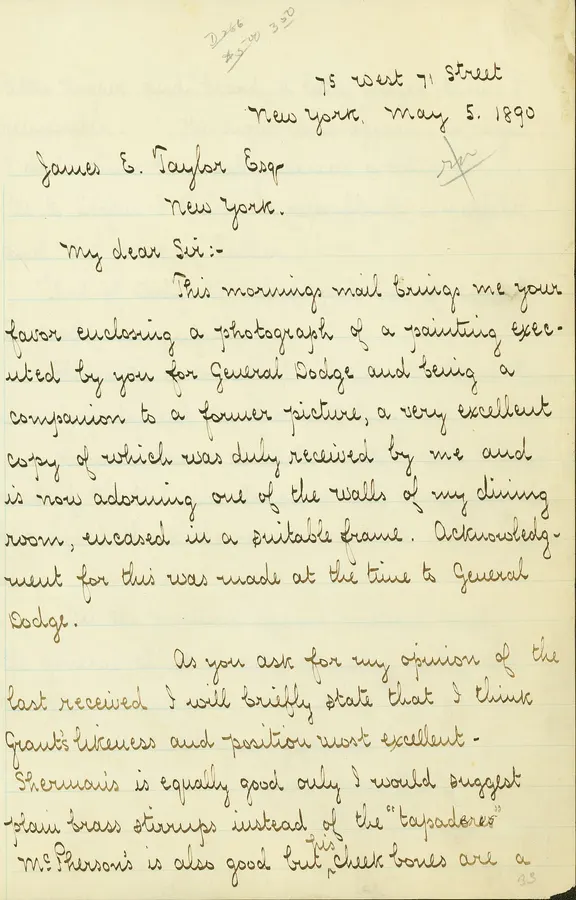
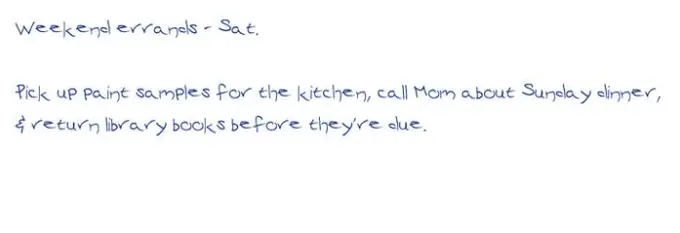
Real Cursive In, Readable Typed Text Out
The transcript keeps the source wording and exposes uncertain readings.
A generic print OCR result may substitute plausible-looking words without showing where the reading is uncertain.
75 West 71 Street New York, May 5, 1890 James E. Taylor Esq. New York. My dear Sir:— This morning's mail brings me your favor enclosing a photograph of a painting executed by you for General Dodge...
William T. Sherman letter to James E. Taylor, May 5, 1890. Public domain; Missouri History Museum via Wikimedia Commons.
How Cursive Translator Works
Upload
Drag & drop or click to upload your file. Supports JPG, JPEG, PNG, WEBP, PDF.
Process
Our AI analyzes your document and extracts the relevant data automatically.
Download
Review the results and download as Editable text / Word.
What This Cursive Translator Does
Handwriting OCR, not a font generator
This tool reads connected handwriting from an uploaded image or PDF and returns editable digital text. It does not turn typed words into a decorative cursive font.
A faithful transcription
Names, dates, abbreviations, wording, paragraphs, and meaningful line breaks stay as written. The tool does not modernize, summarize, or rewrite the source.
Uncertainty stays visible
Connected letters, flourishes, faded ink, and irregular spacing can create ambiguous readings. Low-confidence words are marked as [?word] so researchers and families can compare them with the original.
Who Uses Convert Cursive Handwriting to Text?
Trusted by professionals across industries to save time and reduce errors
Genealogy & Family Archives
Make letters, diaries, recipes, postcards, and family records searchable, quotable, and easier to share.
Archives & Historical Societies
Create reviewable text for cataloguing handwritten primary sources without hiding uncertain readings.
Researchers & Historians
Digitise names, dates, and passages from letters, journals, and manuscripts for analysis and citation.
Writers & Creators
Move cursive notebook drafts into Word, Docs, Notion, or a CMS without retyping every page.
Teachers & Students
Turn cursive assignments, notes, and source documents into readable text for study and reuse.
Powerful Features
Everything you need for fast, accurate document processing
Image & PDF Input
Read cursive from phone photos, scans, WEBP images, and PDFs
Structure Preserved
Keeps page order, paragraphs, line breaks, names, dates, and abbreviations
Uncertainty Markers
Uses [?word] when a reading is uncertain instead of inventing text
Editable Workflow
Review the text, then export to Word, TXT, JSON, or CSV
Built for Cursive Failure Cases
The prompt handles the visual details that print OCR commonly loses.
Connected Letters
Reads joined letterforms in context rather than expecting isolated printed characters.
Flourishes
Separates decorative strokes from the words they surround.
Faded Ink
Attempts faint passages while marking uncertain words for review.
Irregular Spacing
Preserves meaningful line and paragraph structure despite inconsistent gaps.
Before vs After
Before
Slowly deciphering and retyping cursive pages while losing track of uncertain names and words.
After
A searchable typed transcript that preserves the source and clearly marks readings that need human review.
How We Compare
Cursive needs contextual handwriting recognition and a reviewable failure mode.
| Feature | DocuGenie | Generic print OCR |
|---|---|---|
| Reads connected script | ✓ | Limited |
| Marks uncertain words | ✓ | ✕ |
| Preserves original wording | ✓ | Varies |
| Accepts images and PDFs | ✓ | ✓ |
| Exports editable text | ✓ | ✓ |
Convert Cursive Handwriting to Text FAQ
Common questions about using Convert Cursive Handwriting to Text
A cursive translator reads connected handwriting from a photo, scan, or PDF and converts it into editable typed text. This tool transcribes real handwriting; it is not a typed-text-to-cursive font generator.
Related Tools
Cursive Translator is one of 17 document tools in DocuGenie
Skip paying for a separate app for every task. One DocuGenie subscription bundles handwriting OCR, image-to-text, PDF and Excel conversion, translation, summaries, and more - from $9/mo. Use your credits on whichever tool you need.